

Coverage gap analysis
Find the coverage gap before a claim does.
Assets are bought, units move, headcount changes, and the cover does not always follow. SAIBA Corporate compares the register with your policies and tells you what needs attention.
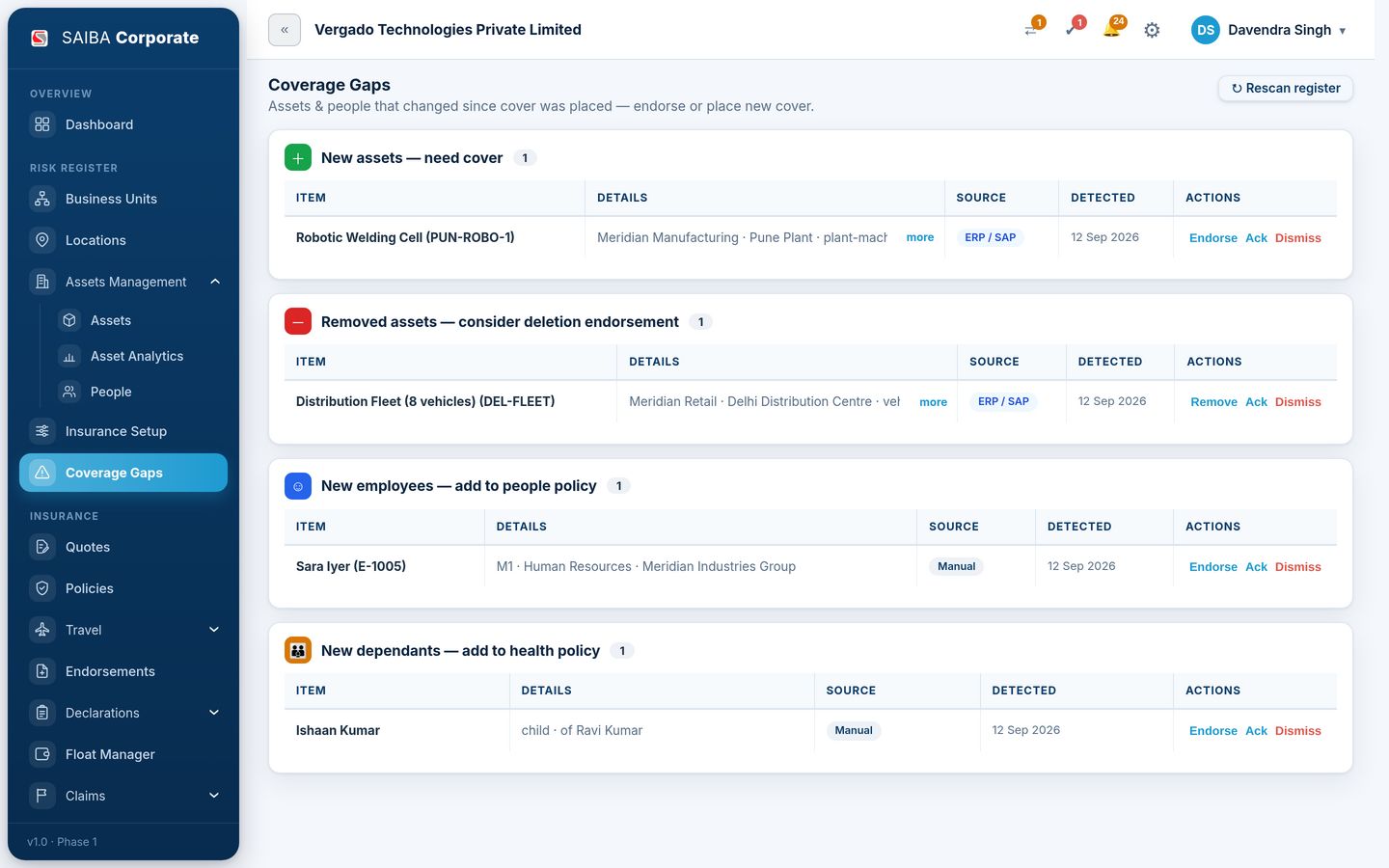
How gaps are found
You state the cover each asset class and employee group should carry. Whenever the register changes, the scan shows the difference.
- New assets that need cover
- Removed assets to consider for a deletion endorsement
- New employees to add to a people policy
- New dependants to add to a health policy
What you do about it
Each item comes with an action, so the gap is closed on the record it belongs to.
- Endorse from the gap itself
- Acknowledge, or dismiss with the decision on record
- See where each item came from: ERP or SAP feed, or manual entry
Questions
What is a coverage gap?
Any difference between the cover you should have and the cover you hold, such as an asset never added to a policy or a new employee missing from a group scheme.
Does it work for people as well as assets?
Yes. Rules can be set by asset class, or by employee primary group, category, grade, role or salary band.
Further reading: on the SAIBA blog.
See your insurance programme in one place.
Bring your existing book and see it as a single, live portfolio, on your own data. No generic demo.